gtasks
· 🪦 retired
A command-line client (Ruby gem) for managing Google Tasks from the terminal. It can list, add, complete, and delete tasks, and clear all completed tasks at once; complete and delete accept a task number or, alternatively, a regular expression matched against task names for batch processing.
Google’s OAuth2 authentication is handled entirely within the command: on first run it starts a small local WEBrick server to receive the callback, then saves the obtained token to a file for reuse.
Internal design
The single file lib/gtasks.rb contains three layered classes: GoogleTaskAPI, which handles REST calls and authentication; GoogleTask, which wraps it in convenient methods; and GoogleTaskCLI, which formats output for the terminal.

- bin/gtasks — Subcommands are
list/lists/add/clear/done/delete/choice(no arguments defaults tolist). Fordoneanddelete, a numeric argument selects a task by its list number; anything else is interpreted as a regular expression, and all tasks whose names match are processed in one batch. The API client_id / client_secret are retrieved via the pit gem, so they never appear in the code - GoogleTaskCLI — The presentation layer. It displays tasks numbered in the form
[0] ☐ title, with completed tasks shown as ☑.choicepicks one task at random from the list and displays it - GoogleTask — The middle layer, providing number-based
done/deleteplusdone_if/delete_iffor batch processing by regular-expression match on titles. “Completing” a task is implemented by updating itsstatustocompleted - GoogleTaskAPI — A thin wrapper around the Google Tasks API v1. It covers get/create/update/delete for both tasks and task lists, plus clearing all completed tasks, and makes HTTP calls through an access token from the oauth2 gem
Authentication works like this: on first run it prints the authorization URL for the user to open in a browser, receives the authorization code on a local WEBrick server (by default /oauth_callback on port 9999), exchanges it for a token, and saves it as YAML to ~/.google_tasks.yml. Since it requests access_type=offline it also receives a refresh token, so subsequent runs just load the file and refresh — no browser needed.
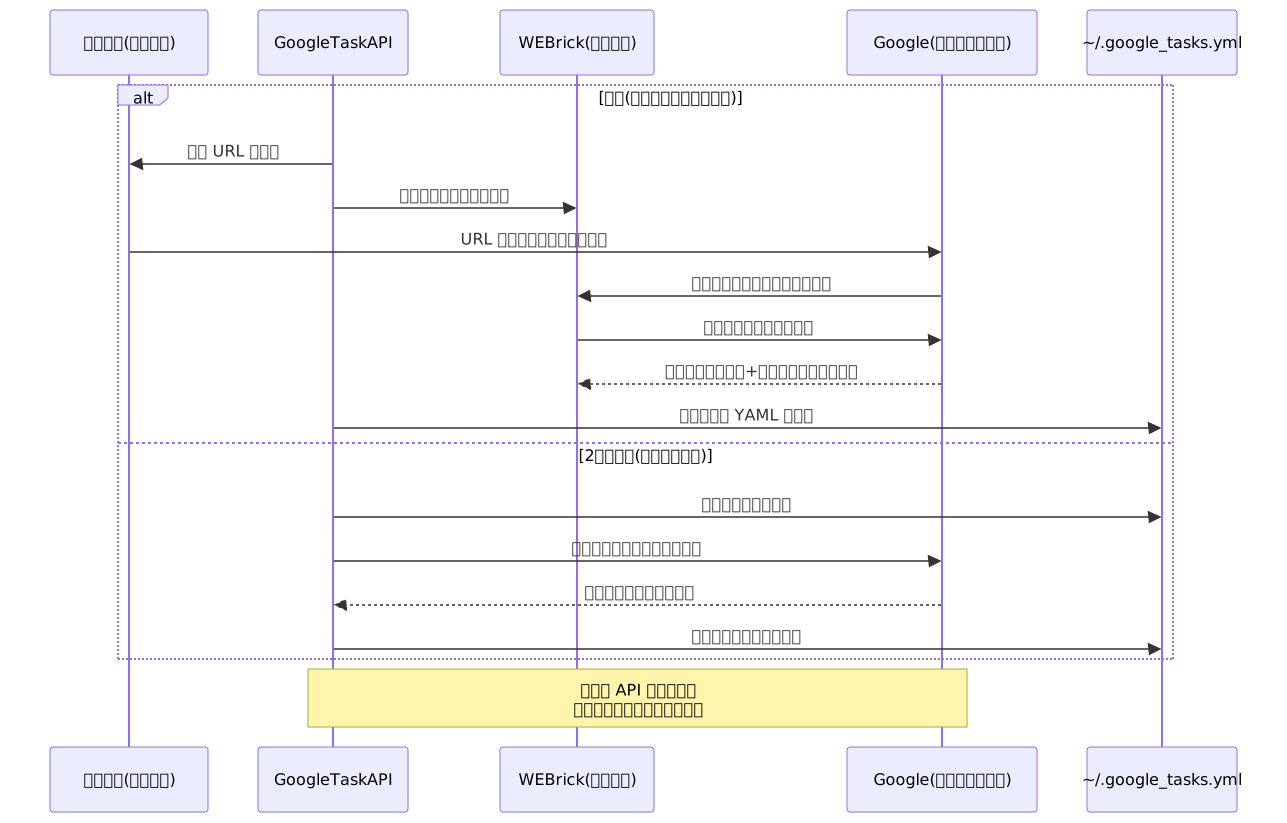
If the saved file has no refresh token it falls back to re-authentication, and if the initial authentication fails it deletes the token file so it can be recreated.