kimotter
· 🪦 retired
A Ruby client for posting tweets from the command line. Instead of using the Twitter API directly, it posts by driving the mala API (a web posting form that lived at http://api.ma.la/twitter/) with Mechanize. It was published as a gem.
Usage
Requires Ruby 1.9 plus nokogiri and mechanize (per the README).
gem install kimotter
kimotter "ツイート本文"
Before posting, you are asked to agree to a confirmation message extracted from the page. Example run from the README.
> kimotter "EventSource知らんかった、普通に便利そう"
嘘偽りなく自分がキモトであると誓います[y/N] y
hi kimoto. try to tweet your cool message
done!
There are two options: -d, --debug (debug mode) and -f, --force (run while ignoring the API limit).
Internals
Component layout. It’s a small gem of roughly 170 lines total, built as two layers: the Kimotter class that drives the form, and KimotterCLI which handles the interactive side.

- Kimotter (
lib/kimotter.rb) — providesfetch_api_limit(GETs the endpoint and parses the API limit values and the confirmation message),tweet(puts the text into the posting form’sstatusfield, checks theis_kimotocheckbox, and submits), andapi_limit?(determines whether usage has hit the cap) - HTML parsing (
load_from_mala_html) is done with Nokogiri. It readsAPI Limit: used / capfrom the body text with a regex, and extracts the text next to the form’s checkbox as the confirmation message - The
filtermethod is a hook for transforming the text before posting; the default is a pass-through (a code comment says “override it if you need to”) - KimotterCLI (
lib/kimotter_cli.rb) — handles option parsing (-d/-f/-a(override the endpoint URL)), receiving the text, the API limit check, the y/N confirmation, and choosing the exit code. When no text is given as an argument, it launches$EDITORon a temp file to write it, and newlines are replaced with spaces - bin/kimotter / bin/koiketter — both are nothing but a call to
KimotterCLI.execute; koiketter is a separate command with its endpoint pointed athttp://kimoto.ssig33.com/api
The flow of a single post looks like this.
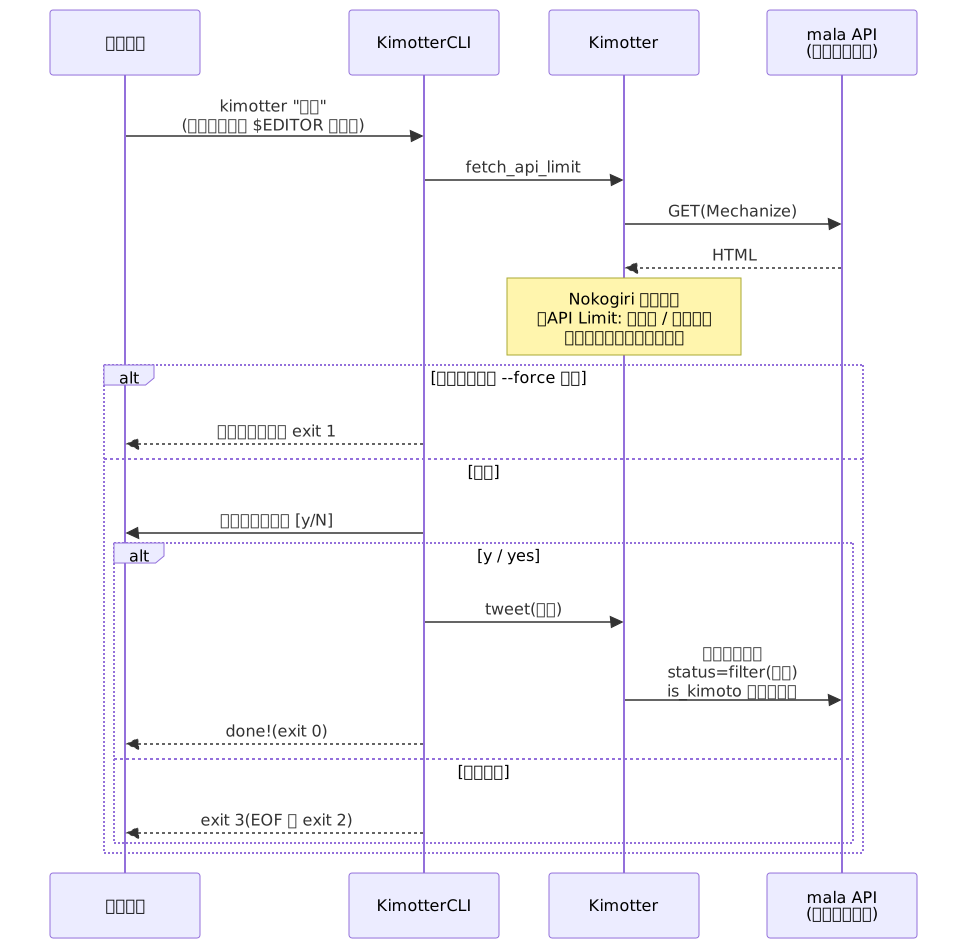
Exit codes: 0 on success, 1 when stopped by the API limit, 2 when the confirmation prompt got EOF, and 3 when declined with anything other than y.